

How to save backup and restore contacts on phone | English with Subtitle CC | Abhi Videos Digital
*Information :
1. Do not copy/Download this video AND also do not copy Video title / description
2. This audio / video / post uploaded for learning and informational purpose
3. Subtitle / Closed captions are translated from English into another language using Google Translate, check video player settings
Method one : open smartphone's default contact app
then in top right corner select 'more' option, then select 'settings' option
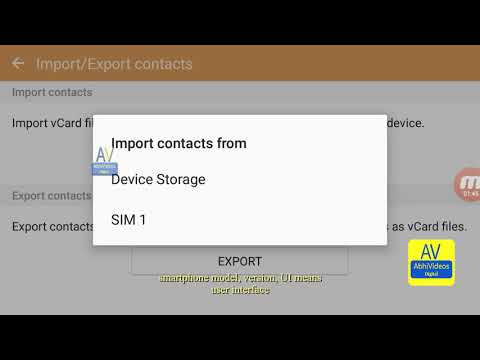
in top select 'import export contacts' option, then select 'export' option, then select 'device storage' or memory card SD card if available or sim card
a VCF file will save in your smartphone storage or memory card SD card or SIM card
to restore those contacts, select 'import' option, then select 'device storage' or 'memory card SD card' or 'SIM card' where you saved your contacts
also if any photo set in your contact and other contact details email, address, notes that will be also save in VCF file
depends on smartphone model, version, UI
Also check other settings in default/main contact app of smart phone, in contact app settings scroll and select 'contacts to display', select 'all contact'
scroll and select 'share multiple contacts', select 'as one file' and if you want to save contacts separately so select 'individually' option
second method : select contacts one by one orin top left corner select 'all' option
then select 'share' option in top right corner or where it's showing on screen
then select 'bluetooth' or 'wifi direct' option and transfer your contacts to another handset or select any other options as showing on screen
also look for other option to save backup and restore contacts on phone
or suggestion take time and note down your contacts on book or text document software or applications like word file, excel file and others
VCF contact file also can open able on computer, laptop, desktop, PC means personal computer
using notepad, wordpad, Microsoft outlook among other types of software or applications
note: this might look different it's depends on smartphone model, version, UI means user interface
Time stamps / time code :- (on YouTube)
00:00 Intro (with Subtitle/CC in English and other languages)
00:06 other options in default contact app settings
00:47 Import and export of contacts on phone to save/backup and restore
01:58 transfer contacts using bluetooth / wifi direct / other and a suggestion
03:07 Outro
Website: http://abhivideosdigital.blogspot.com
YouTube: https://www.youtube.com/c/AbhiVideosDigital
Share your feedback/comment: http://abhivideosdigital.blogspot.com/p/comments.html
Facebook page: https://www.facebook.com/AbhiVideosDigitalyt
Google podcasts: https://podcasts.google.com/search/abhi%20videos%20digital




No comments:
Post a Comment